On this page
This review is sponsored by Nomad eSIM, which also provided a coupon that covered the cost of the plan I used. This article contains affiliate links; if you buy through them, JAPANODE may earn a commission at no extra cost to you. The experience and assessment below are my own.
I used Nomad eSIM around Osaka on a Google Pixel 7, doing the things I normally do on my phone: checking X and Instagram, watching TikTok and YouTube, and opening Google Maps when I went out. It felt much like using my usual mobile connection. I didn't find myself changing those habits to work around it.
Setup was straightforward too. I installed the app, followed the instructions and didn't find any part particularly difficult. Having done it once, I would be happy to use it again.
That makes Nomad eSIM worth considering for an ordinary Japan trip. There are still a few details to get right before buying, especially which countries your plan covers, when its validity starts, and what “unlimited” means. I tested a regional plan covering China, Japan and South Korea, rather than the Japan-only product. Here is what that experience tells you, and where it stops.
Is Nomad eSIM a good choice for your Japan trip?
My experience makes me comfortable recommending it for travelers who want their usual apps working on a compatible phone without collecting a rental router. The strongest reason to choose it is the range of plans: you can match a data allowance to a Japan visit or choose regional coverage for a longer itinerary.
For Japan alone, start by comparing the Japan-only price with the amount of data you actually need. For Japan plus South Korea or China, check the regional offer before buying separate plans. Those options serve different trips; the regional plan I used shouldn't automatically be your first choice.
I would look more closely at alternatives if you need a Japanese phone number, have a carrier-locked phone, or need a connection primarily for laptop work. I didn't test tethering or remote-area coverage. Our Japan eSIM comparison and pocket WiFi versus eSIM guide can help with those decisions.

Nomad eSIM for Japan
Best for
Travelers choosing between fixed data, unlimited-style data and regional coverage
Before booking
Data-only; unlimited-style plans have speed limits, and networks vary by plan.
Why it may fit
Compare the Japan-only allowance and validity with your trip before choosing a plan. Regional coverage is worth checking if Japan is one stop on a longer itinerary.
What I used, and how it worked around Osaka
My phone, plan and everyday use
| Test detail | What I used |
|---|---|
| Area | Osaka and the surrounding area |
| Phone | Google Pixel 7, Android |
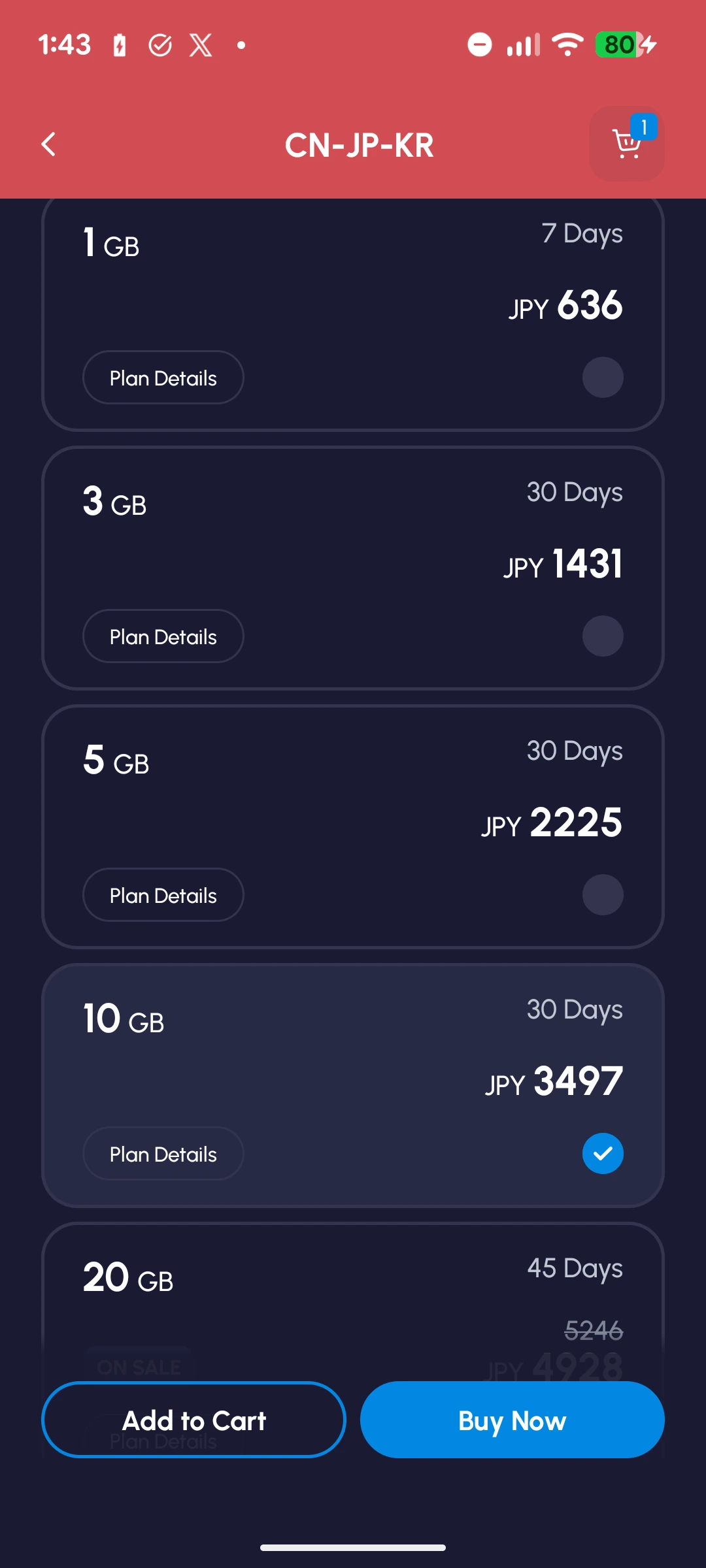
| Plan | CN-JP-KR regional plan, 10 GB / 30 days |
| How it was provided | A complimentary coupon from Nomad eSIM |
| Apps used | X, Instagram, TikTok, YouTube and Google Maps |
| Tethering | Not tested |
The screenshots in this review were taken during my August 2026 use. They show the app and Android screens I saw then. Three images include English translations added by JAPANODE and are labeled as edited reference images. Prices and layouts may have changed; the separate price table below uses the official listings checked on October 9, 2026.
The useful result for me was simple: the apps I normally use behaved as I expected. Social feeds, videos and maps didn't become something I had to plan around. That matters more to my recommendation than a single peak download-speed number.
This was everyday use by one person on one phone. I didn't run a controlled comparison against other providers, travel across Japan to measure coverage, or test how an unlimited plan behaves after its high-speed allowance runs out. My experience also doesn't establish how customer support performs when something goes wrong.
What the connection screen showed
My Android settings showed a KDDI connection and a 5G indicator. A separate quick-settings screenshot shows mobile data active with WiFi off. These support the account of using the cellular connection; they don't promise that every Nomad eSIM plan will select the same network.
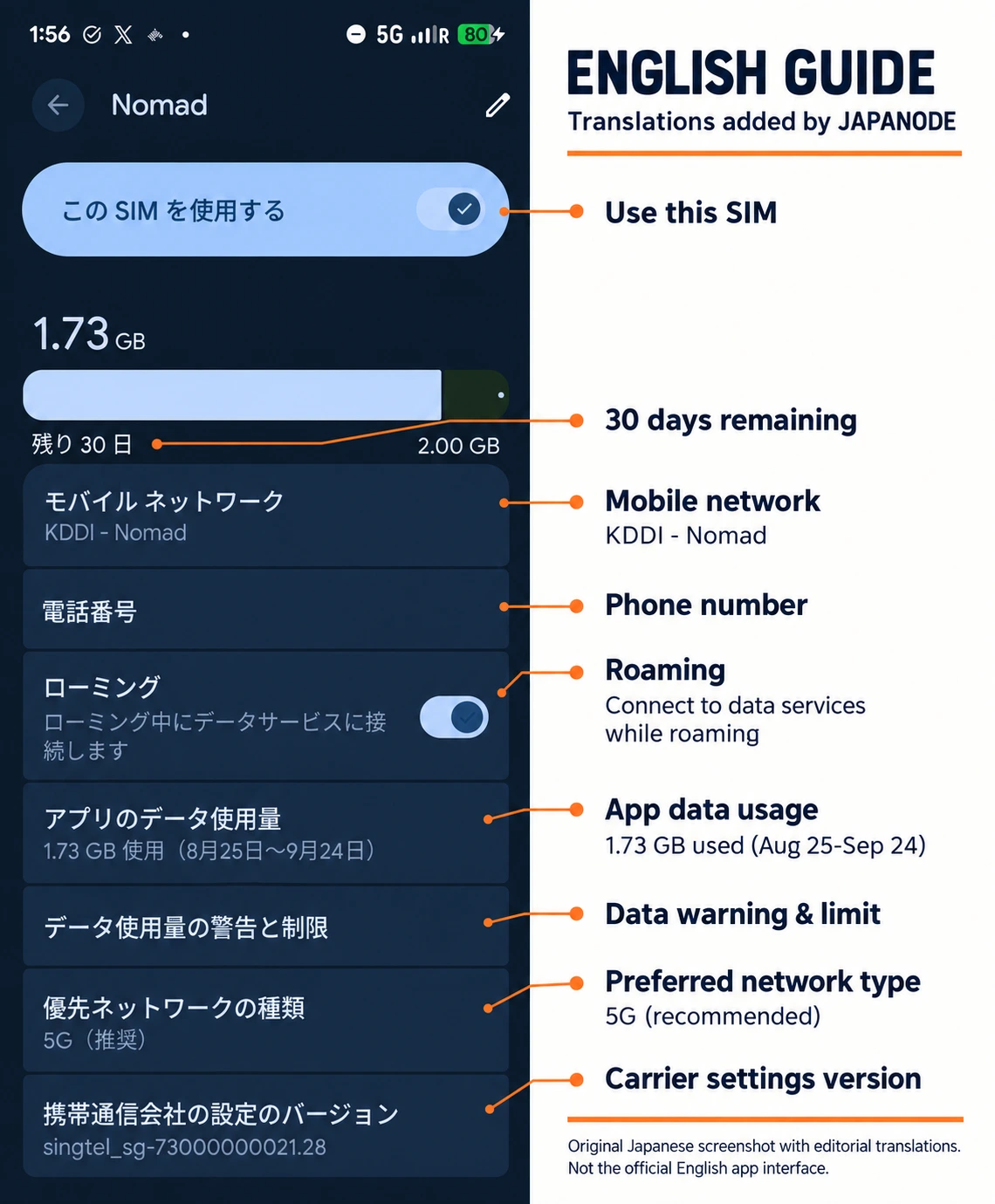
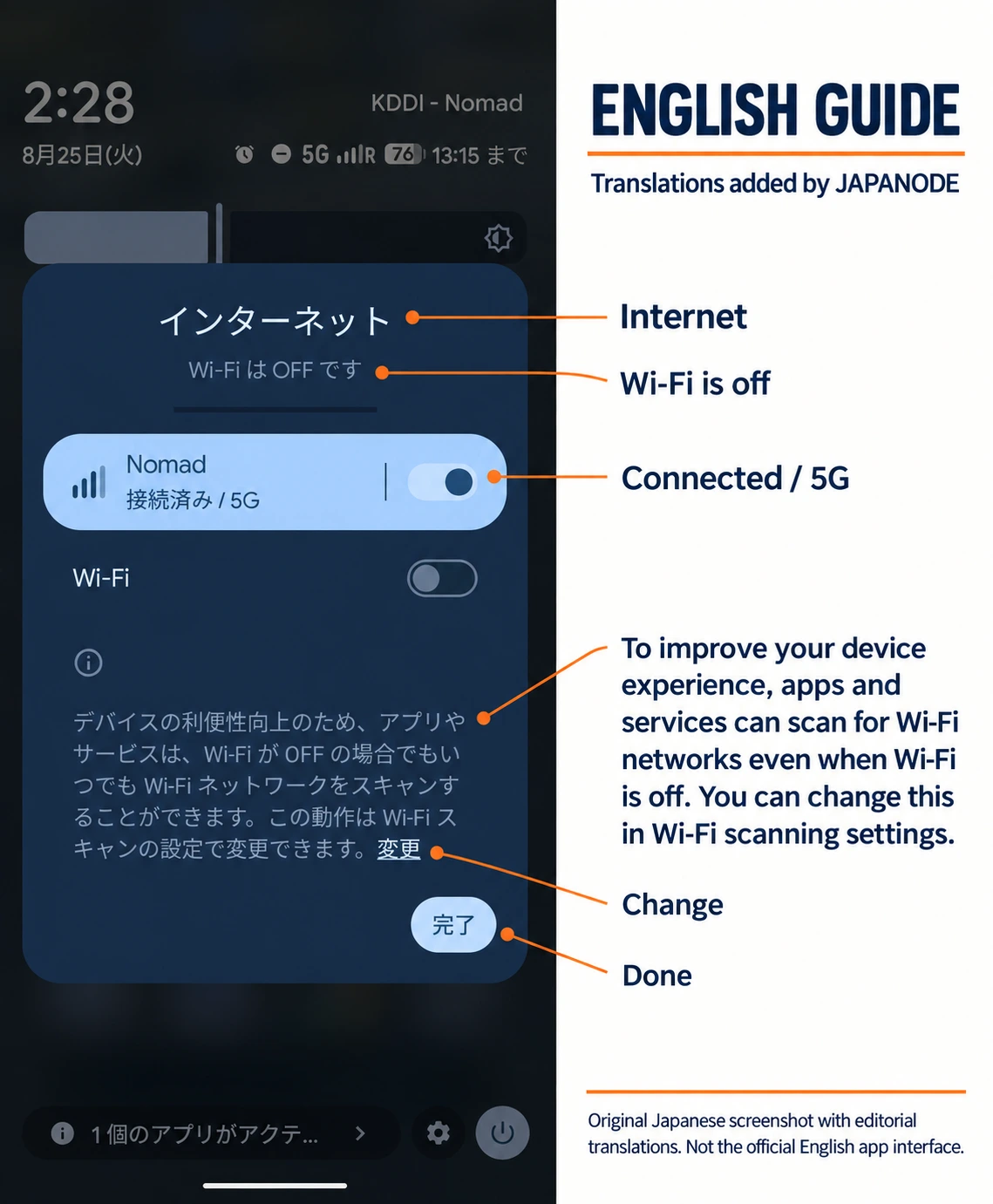
That Android usage display can be confusing. Nomad eSIM's explanation of the Android 2 GB warning distinguishes the phone's data-warning setting from the purchased allowance. Check your plan balance in the app instead of assuming that “2 GB” is your package size.
Japan plans, regional coverage and current prices
Start with the trip you are taking
Nomad eSIM sells plans for more than 200 destinations, according to its company information. That describes its catalog. It doesn't mean one purchase covers every destination.
The CN-JP-KR plan I used covers China, Japan and South Korea. A regional package can save you from buying another plan at the next stop, but check every destination and the total validity period. I only used mine in Japan, so I can't report how the cross-border switch works in practice.
For a Japan-only holiday, extra coverage may have no value to you. Compare like with like: the same allowance, duration and currency, with any sale clearly identified.
Japan-only price examples
The following USD listings were checked on the official Japan plan page on October 9, 2026.
| Data | Validity | Listed price |
|---|---|---|
| 1 GB | 7 days | US$4 |
| 3 GB | 30 days | US$7 |
| 5 GB | 30 days | US$10 |
| 10 GB | 30 days | US$16 sale; US$18 crossed out |
| 20 GB | 30 days | US$23 sale; US$26 crossed out |
| 50 GB | 30 days | US$35 |
| Unlimited-style | 3 / 7 / 14 / 21 days | US$11 / US$25 / US$41 / US$49 |
These are price references, not a guaranteed checkout total. Confirm the currency and final amount before paying. The screenshots below show the older yen-denominated offers from my app; use the dated table above for this review's current comparison.
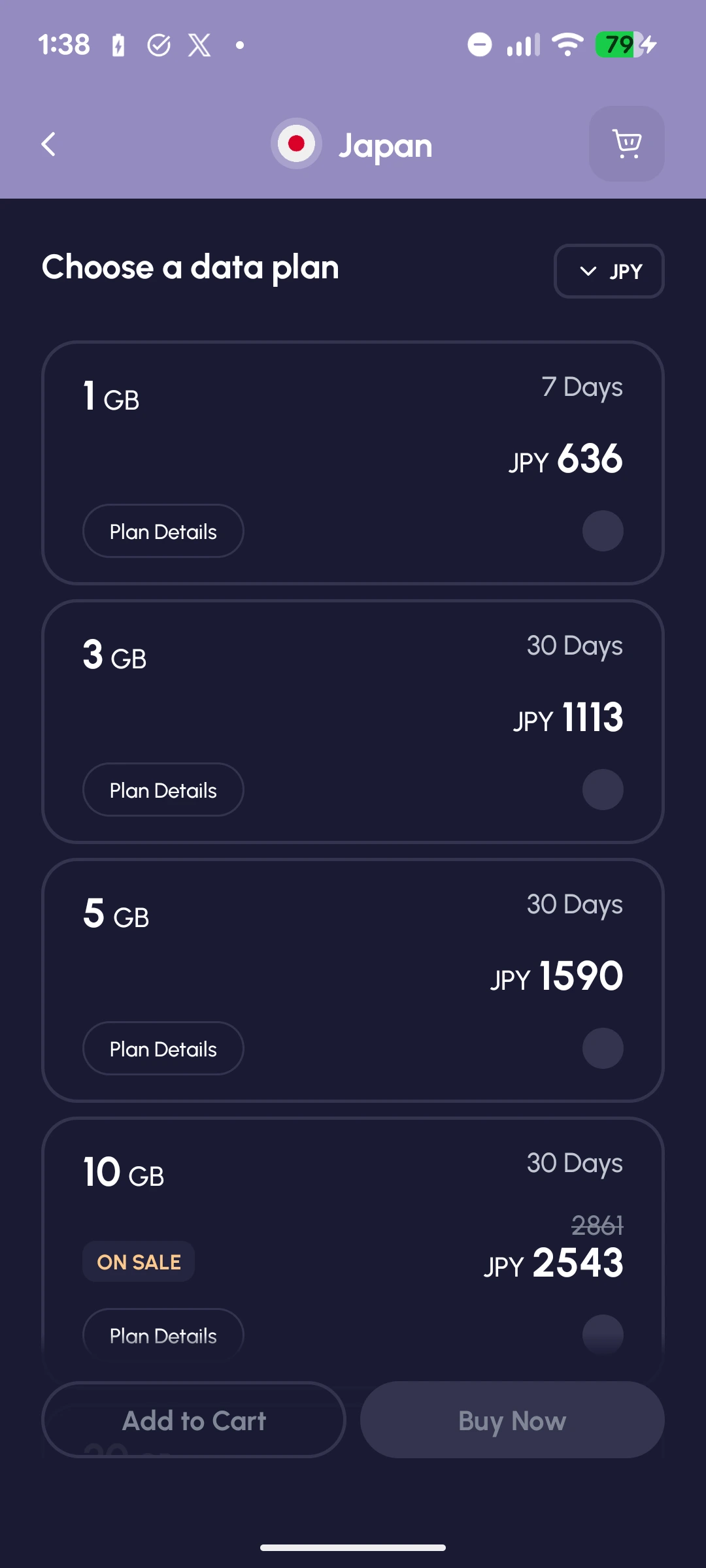
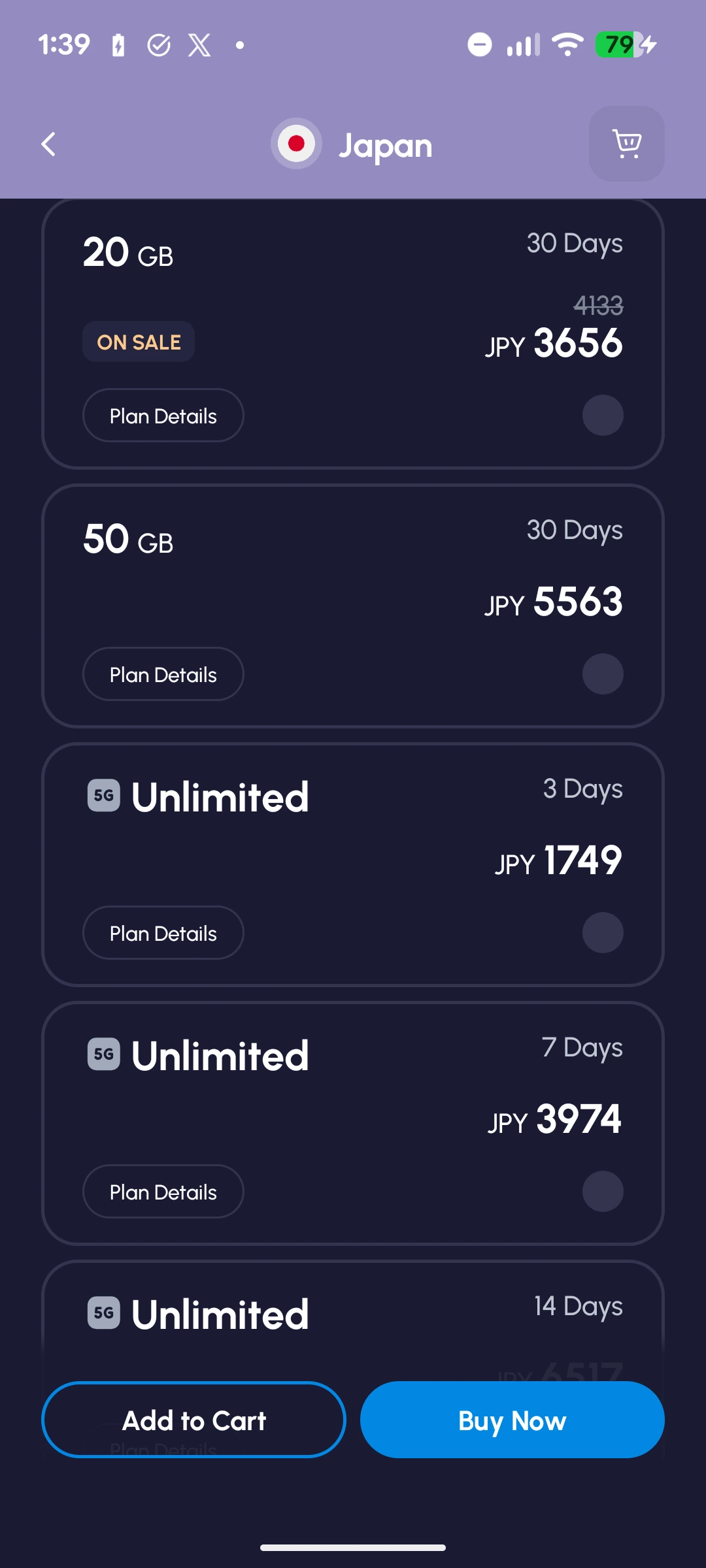
Fixed data or unlimited-style?
I would start with fixed data if you have a reasonable idea of your usage. Look at your phone's recent mobile-data history, then consider whether you'll watch more video while traveling. Downloading entertainment on hotel WiFi leaves more of the allowance for the moments when you need a mobile connection.
“Unlimited” does not mean full speed throughout. On the Japan unlimited plans, speeds are reduced after the first 2 GB. Check the selected plan’s terms before paying, especially if you depend on video streaming or laptop work. I did not test an unlimited plan.
Buying and installing it on Android
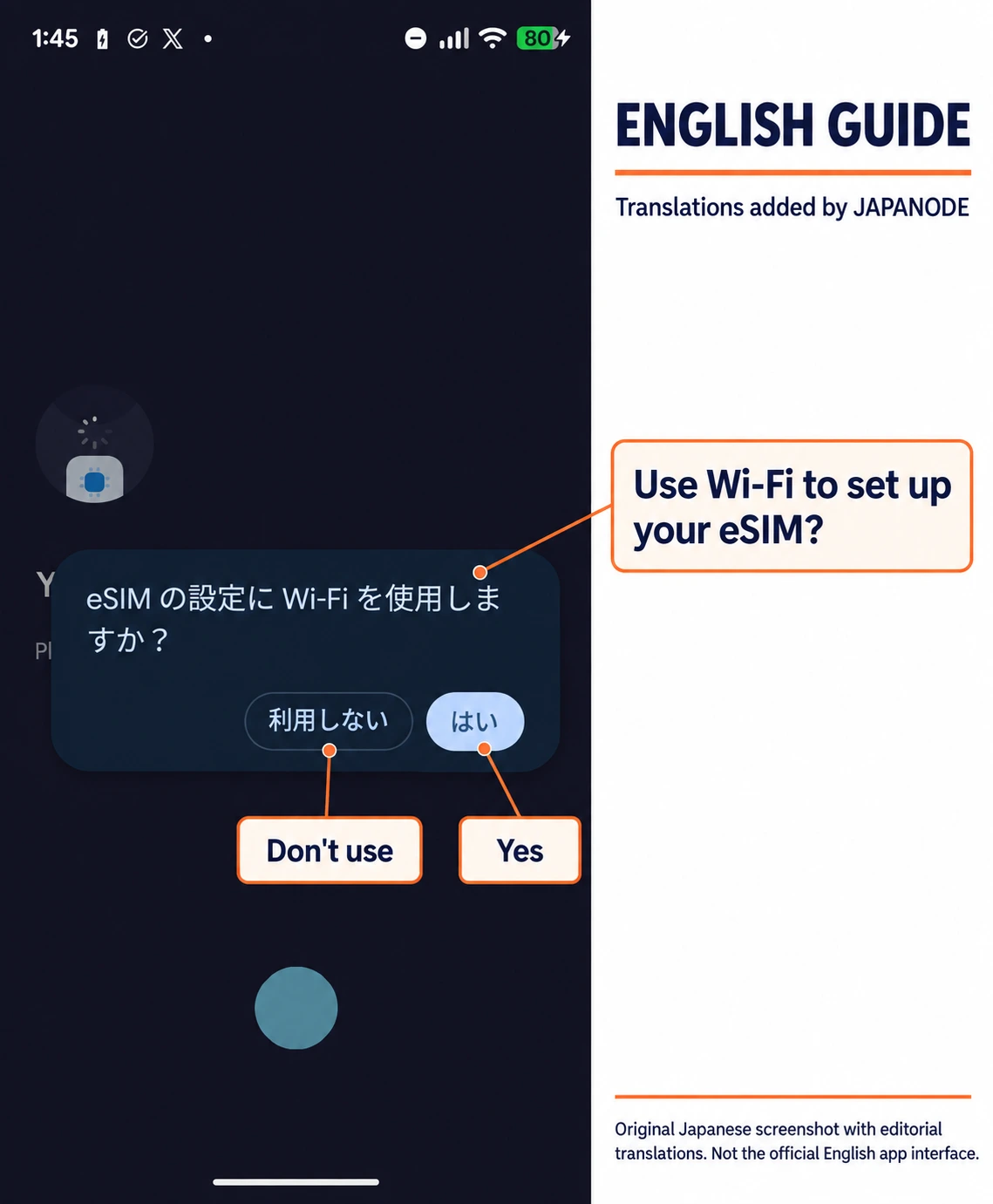
I didn't find setup difficult on my Pixel 7. These screenshots show the sequence, including Android's own confirmation screens. Menu names vary by phone and software version, so follow the instructions attached to your purchase.
1. Check compatibility and choose the right coverage
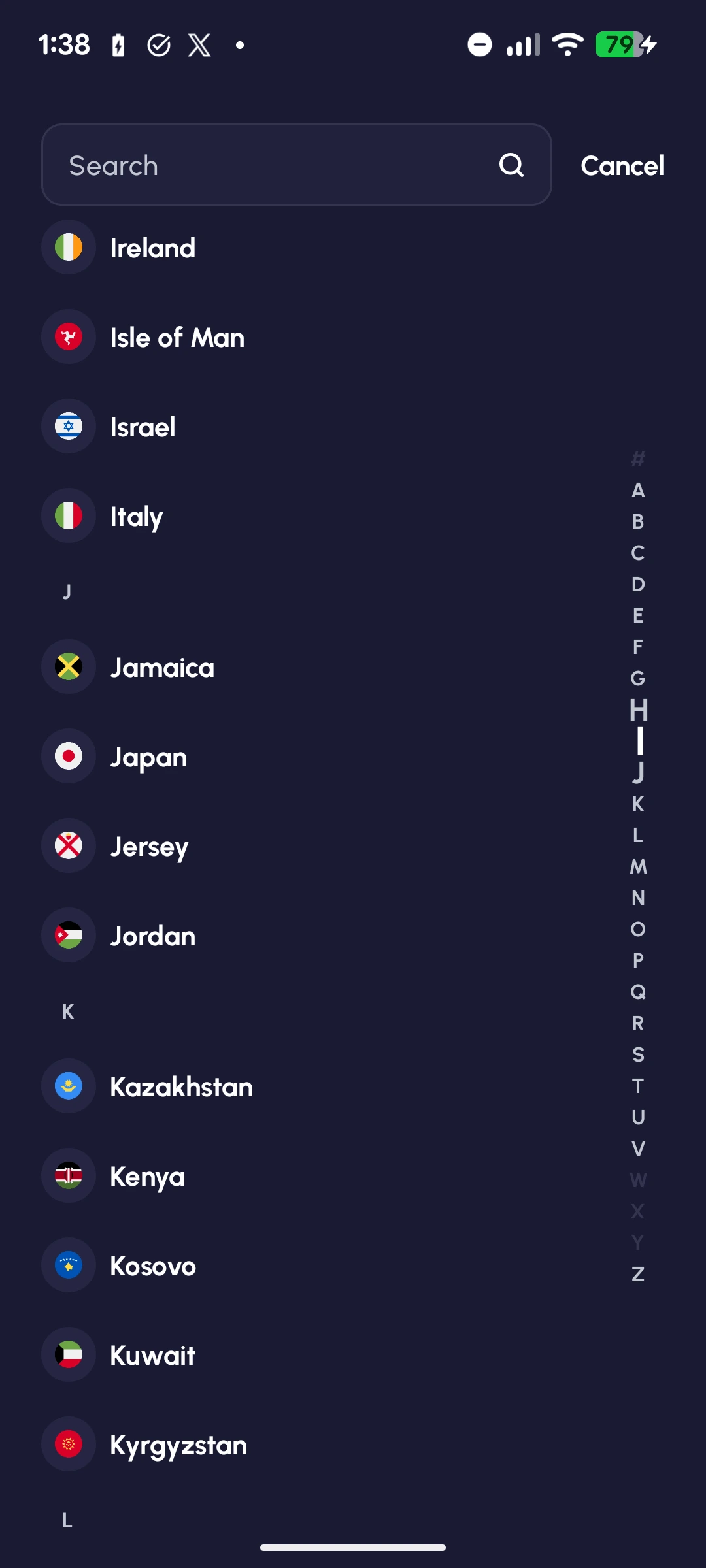
Use the official device checker for your exact model and confirm that your phone is carrier-unlocked. My Pixel 7 worked, but that doesn't establish compatibility for every device sold under a similar model name.
In the app, search for your destination, open the plan and check the country list, data allowance and validity. If you are using a discount, check the final total before completing the purchase. The coupon I received covered my test plan; it wasn't a public reader discount.
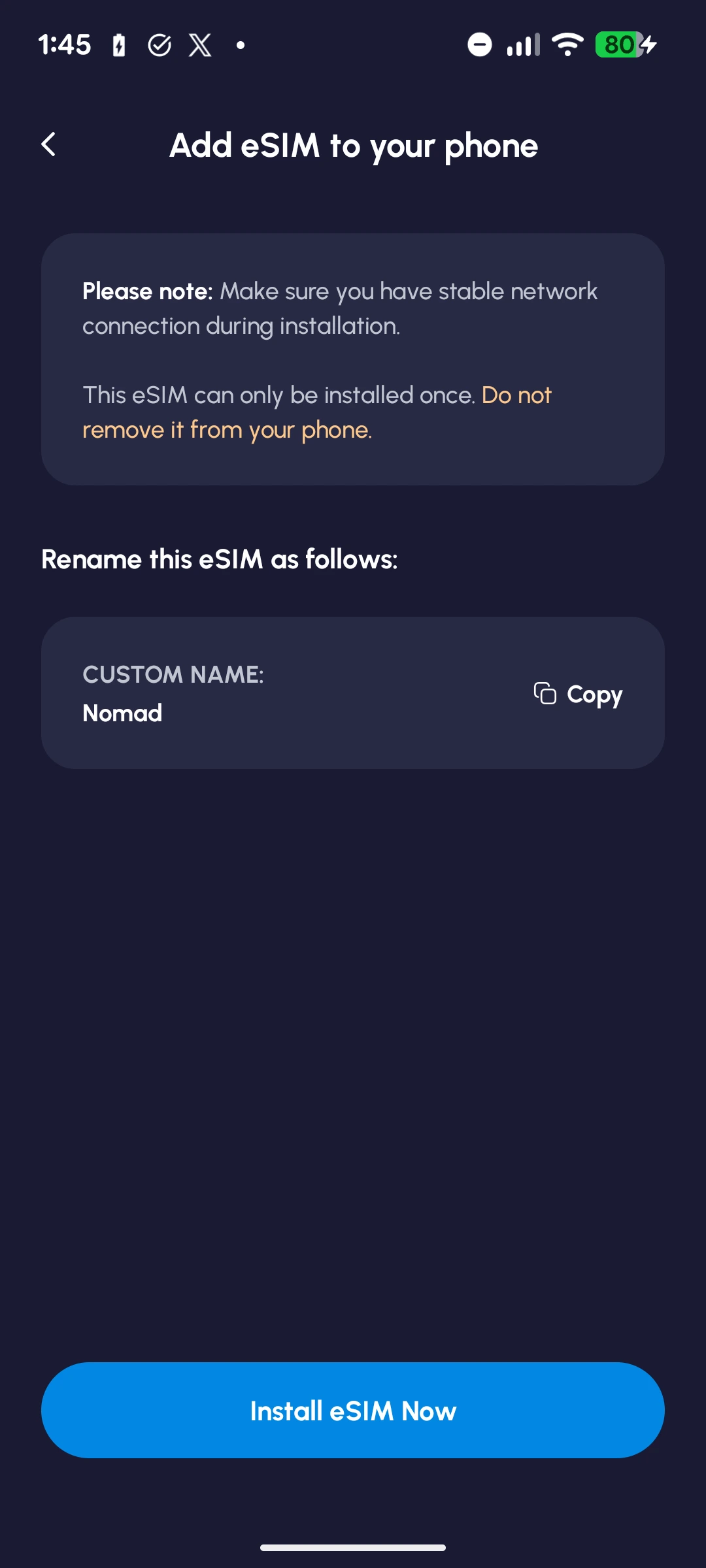
2. Install while you have a stable connection
The app provides installation instructions after purchase. I followed its Android installation flow. Keep a working internet connection available while the eSIM profile downloads, and read the on-screen warning before continuing.

3. Check the result, then set the data line
The app displayed a successful-installation message and instructions for starting the plan. Installation adds the profile to your phone; connecting it to a supported network starts most plans' usage period.
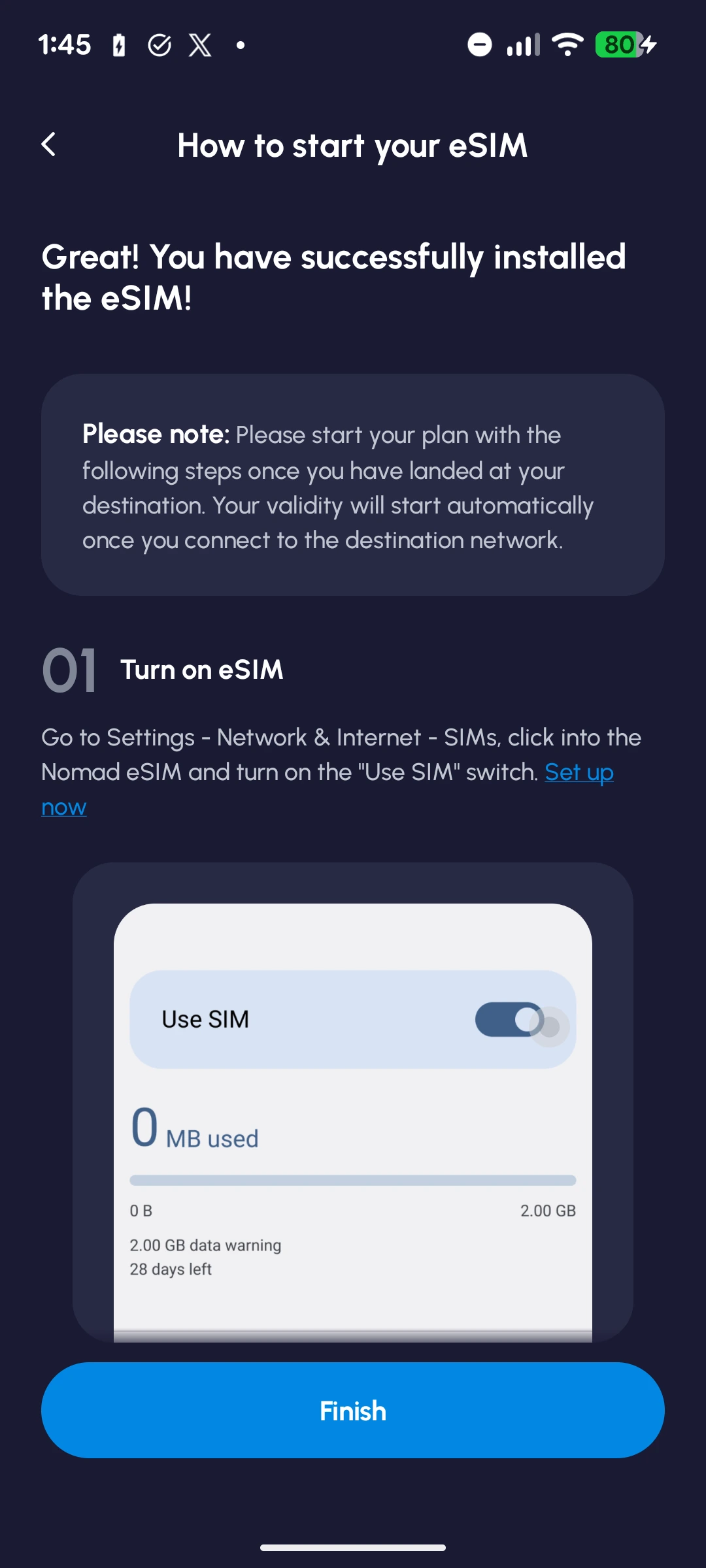
Nomad eSIM's activation instructions say to enable the travel line, select it for mobile data and turn on data roaming for that line. Turn off data roaming on your home line if you don't want it using paid roaming data, and check automatic data-switching settings. Home-carrier calls and SMS have separate terms.
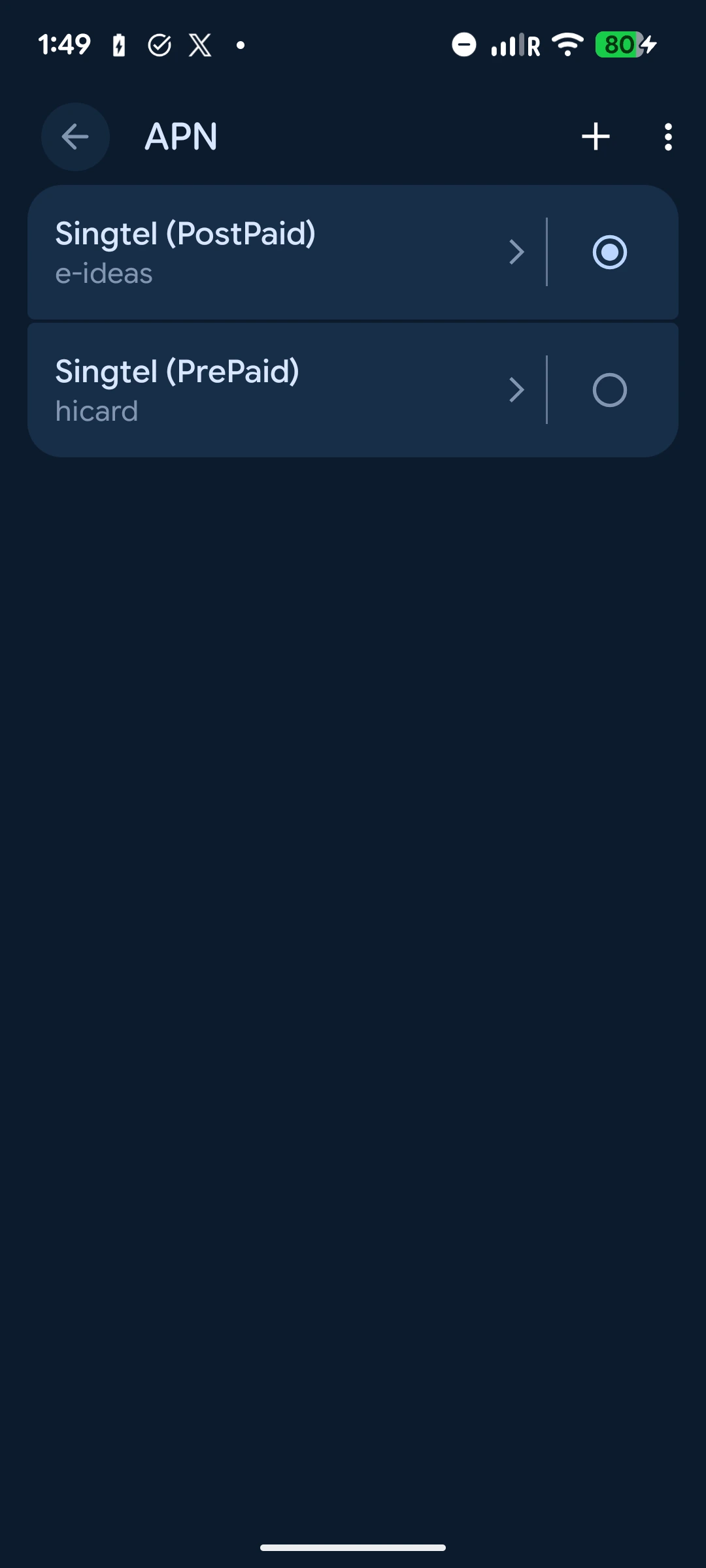
4. Follow your own plan's APN instructions
My screenshots include the Android access-point screen. Keep any APN settings specific to your purchased eSIM: copying an APN from someone else's review can create a problem rather than solve one.
If the phone doesn't connect, review the data-line and roaming settings first. Then follow the plan's troubleshooting instructions or contact support. The reinstallation guidance varies by eSIM, so avoid deleting the profile while experimenting.
When does the plan start, and can you add more data?
The activation deadline is separate from plan validity
A 30-day plan does not give you unlimited time to begin using it. The activation policy gives most paid plans a 60-day activation window. Many start automatically at that deadline if unused; some provider-specific plans expire instead. Your order's instructions take priority.
For plans that start upon connection, you can normally install ahead of arrival without starting the validity period while outside the covered destinations. Be more careful with a regional plan if you are already in one of its covered countries: it may connect there and start the clock before your Japan flight.
I used mine while already in Japan. My screenshots therefore don't document an airport arrival or a first connection after landing. For your own trip, install on reliable internet, save the instructions somewhere accessible, and follow the plan-specific timing.
Add-ons are a separate purchase
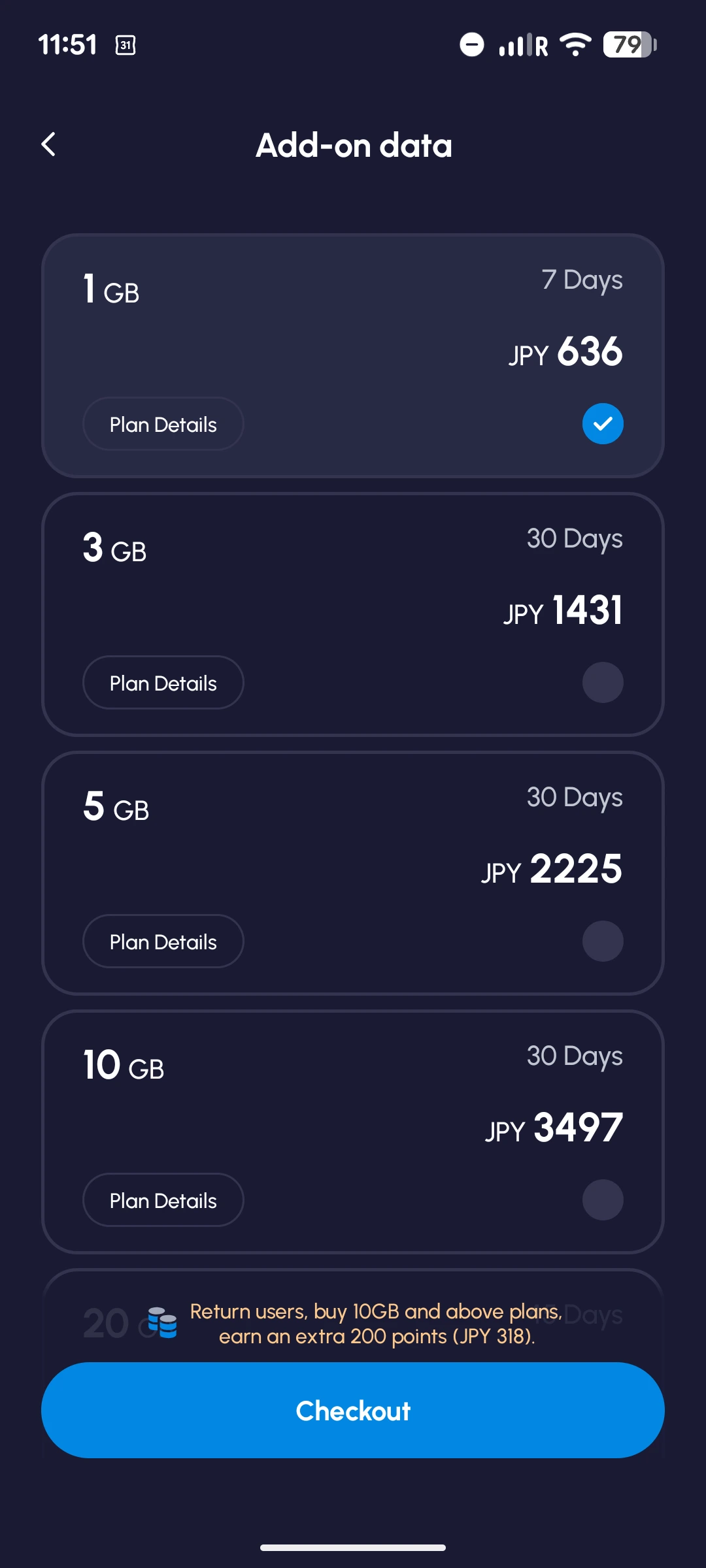
The app showed add-on options for my plan. According to the add-on policy, an available add-on uses the same eSIM and starts after the current plan runs out or expires. It doesn't simply extend the original package or roll unused data forward. The screenshot below documents the available options, rather than a completed top-up.
The limits I would check before buying
Data-only service and hotspot use
The phone-number guidance explains that most travel plans are data-only. The Japan offer doesn't give you a Japanese number for standard calls or SMS. Messaging and internet calling apps can still use the connection, but a restaurant requiring a conventional phone call is a different problem.
Some UK plans include a phone number with calls and SMS. That is a separate UK offer; the Japan plans discussed here are data-only.
Nomad eSIM allows tethering, subject to device and network limitations. I didn't use it. If your work depends on a laptop connection, don't treat this phone review as a test of video meetings or all-day hotspot reliability.
Coverage outside the area I used
My experience around Osaka was positive. It doesn't establish reception in mountain villages, on remote islands or throughout a long train journey. Check the underlying carrier for your chosen package and the places on your itinerary. A 5G icon in one screenshot is evidence of that connection at that moment, not a nationwide guarantee.
For trip planning beyond connectivity, our first-time Japan guide covers the other practical decisions worth making before departure.
Free data and rewards
There is a separate free 1 GB trial for eligible new users, advertised for 76 destinations including Japan when checked. It is different from the sponsored 10 GB plan I used. The trial is valid for 3 days from activation and ends earlier if you use all 1 GB, as explained in the official trial help. Each account and device can redeem it once, and claiming the trial affects eligibility for other first-time promotions. Check the app for eligibility and the activation deadline, which differs from standard paid plans.
Weekly Wins: something to check before your trip
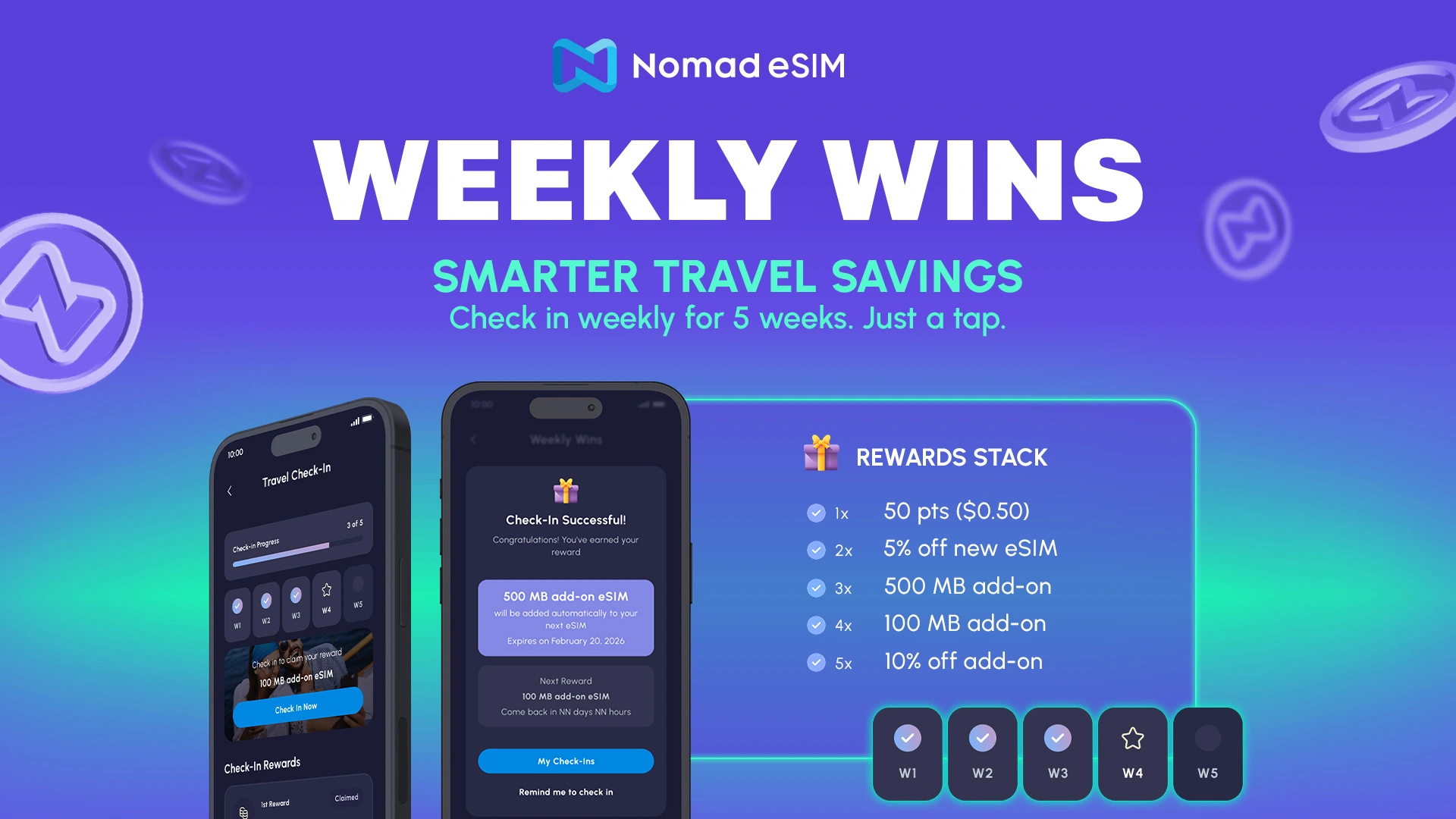
Weekly Wins lets you collect rewards by checking in through the app once a week over a five-week cycle. These can include points, discount coupons and extra data. You can use a reward as soon as you earn it, but the rewards from each cycle expire at the end of week six. If you are planning well ahead, check that the redemption dates work for your purchase.
Free membership: more relevant if you use it again
The free membership program ties your tier to eligible spending over a 365-day cycle. Higher tiers can bring more points back, data vouchers and discounts. These are conditional benefits: the headline maximums do not apply to every account, and points back are credit toward later purchases, not cash back. Guest purchases do not count toward tier progression, so sign in if you want an eligible purchase recorded.
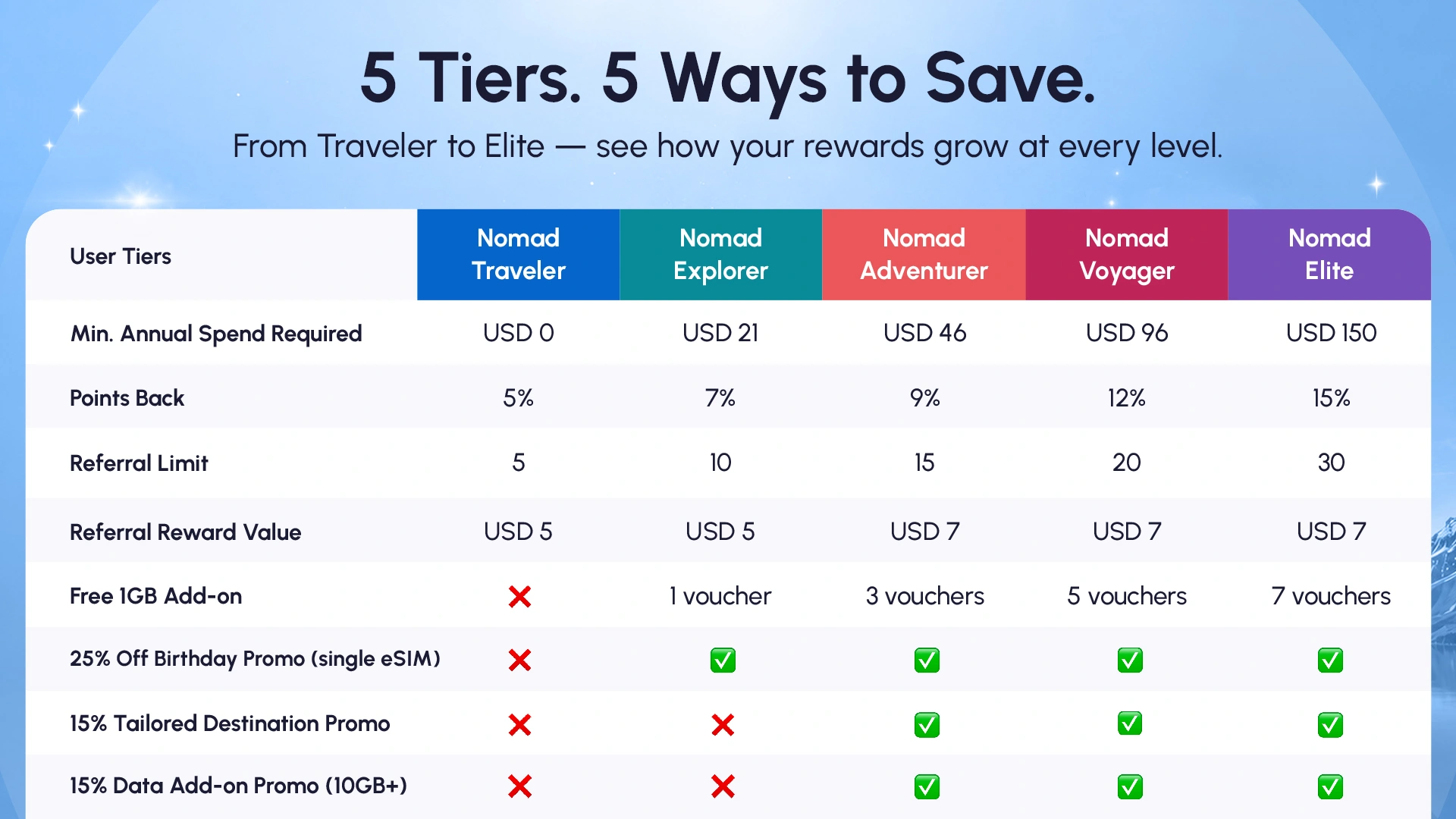
The points and rewards terms are worth reading if you expect to use the service again. For a first Japan trip, I would choose the connection and plan first, then treat any reward I could actually use as a bonus.
How I would choose between Nomad eSIM and alternatives
Choose Nomad eSIM when you want app-based setup and flexibility over allowance or destination coverage. My own setup and daily use give me a reason to return to it. For a Japan-only trip, compare its fixed-data offer with the equivalent Airalo allowance and duration; a shorter-validity plan isn't the same product just because both say 10 GB.
If your route makes explicit Docomo access a priority, compare the relevant Ubigi package and its listed networks. That is a network-selection decision, not proof that one brand is faster everywhere.
If you prefer Holafly's day-based unlimited-style offer, read its Japan terms closely: hotspot sharing is limited to 1 GB per day. Neither provider's “unlimited” label removes the need to check speed-management rules.
For me, the verdict is straightforward: Nomad eSIM was easy to set up and worked comfortably for my everyday use around Osaka. I would use it again. I would buy based on the actual trip, though. Japan-only coverage is the first thing to price for a Japan-only visit; regional coverage becomes useful when there is another covered stop on the itinerary.
Find a Nomad eSIM plan for your trip
Best for
Everyday phone use on a compatible unlocked device
Before booking
My test covered one regional plan on a Pixel 7; it did not cover tethering or remote-area reception.
Why it may fit
Check the countries, data allowance, validity and final price. My Osaka experience was positive; choose the package that fits where you are actually going.
Japan prices and trial terms checked October 9, 2026; other plan policies checked October 5 and rewards information checked October 6. My screenshots document my August 2026 use. The two rewards graphics were supplied by Nomad eSIM. Check the current product terms before purchase.
Make it your trip
Still planning your Japan trip?
Pick the question on your mind. Compare your options, check the details and take one more thing off your list.

Which eSIM fits your Japan trip?
Maps, messages, hotspot use: compare five providers by data allowance, network and plan limits before you choose.
Find my Japan eSIMWould a JR Pass save you money?
Add your train journeys and compare individual tickets with the nationwide pass. See which costs less for your route.
Calculate my rail costs
What should your travel insurance cover?
Compare medical cover, cancellation and activity limits across five options, with the exclusions worth checking.
Compare cover & limitsFrequently Asked Questions
It worked without inconvenience for our everyday use around Osaka on a Google Pixel 7: X, Instagram, TikTok, YouTube and Google Maps. We used a CN-JP-KR regional 10 GB / 30-day plan provided free through a coupon. This was one person's experience, not a nationwide coverage test.
The Japan product page lists KDDI (au) and SoftBank, with availability depending on the selected plan. Our regional CN-JP-KR plan connected to KDDI and our phone showed 5G. Check the network details for the actual plan you buy.
For most plans, the validity period starts when the installed eSIM connects to a supported destination network. Many paid plans have a 60-day activation deadline, but provider-specific exceptions and trial rules apply. Follow the deadline and instructions in your order.
Nomad eSIM permits hotspot use, subject to your device, plan and local network. Sharing uses your plan's data allowance. We did not test tethering, so this review does not rate its performance for laptop work.
The Japan travel plans are data-only and do not supply a Japanese number for ordinary calls or SMS. Internet calling and messaging apps can use the data connection. Your home number and any roaming charges remain subject to your home carrier.
No. We received a coupon for a complimentary CN-JP-KR 10 GB / 30-day plan. The separate consumer trial offers eligible new users 1 GB for 3 days from activation in selected destinations, including Japan. It ends when the data is used up or the 3-day validity expires, whichever comes first. Check the app for eligibility and the activation deadline.

Written by
JAPANODE
Based in Japan, sharing practical travel advice and firsthand experiences to help visitors plan with confidence.